
Download Moo0 ImageThumbnailer – image thumbnailer, thumbnail creator, image resizer, photo thumbnail, fast image resizing
Overview
Moo0 ImageThumbnailer is a lightweight utility application designed for the rapid creation of image thumbnails. Its primary purpose is to simplify the process of resizing images for web use, file sharing, or digital organization. The app addresses the common challenge of manually adjusting image dimensions, which can be time-consuming and inefficient, especially when handling multiple files. By automating this task, Moo0 ImageThumbnailer enables users to generate smaller, optimized versions of their images in seconds.
Target users include individuals managing digital photo libraries, content creators preparing images for websites or blogs, and professionals requiring quick image formatting for presentations or client submissions. The app’s minimalistic design and straightforward workflow make it accessible to users without technical expertise, while its efficiency appeals to power users seeking speed and consistency. Despite being released in 2010, the application remains relevant due to its focused functionality and low resource consumption.
The developer, Moo0, has not provided additional background information beyond the app’s name and release details. However, the app’s enduring presence in the utility space suggests a stable and reliable tool. In the broader app ecosystem, Moo0 ImageThumbnailer occupies a niche role—offering a dedicated solution for a specific task without unnecessary complexity. Its ability to deliver fast results with minimal user input makes it a practical choice for anyone needing a no-frills image resizing tool.
Key Features & Functionality
- Quick Image Resizing: Users can resize images in under five seconds using a simple drag-and-drop interface. This feature streamlines the workflow for batch processing, allowing users to drop multiple images into the application window and receive resized thumbnails almost instantly.
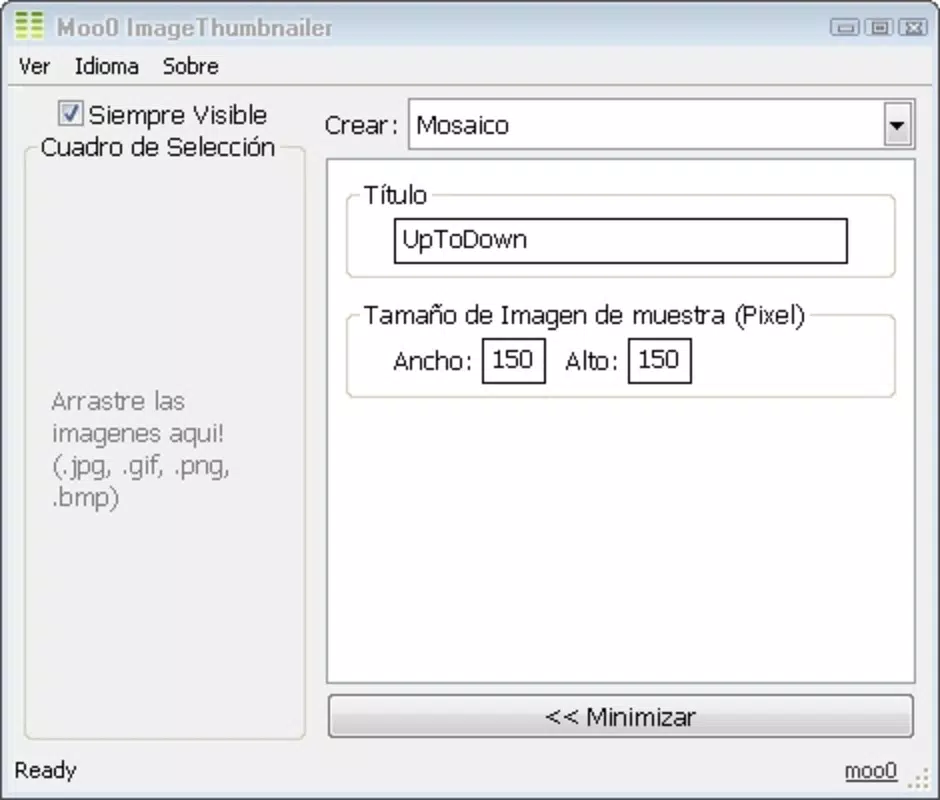
- Multiple Size Options: The app supports customizable thumbnail dimensions, enabling users to select from predefined sizes or set custom values. This flexibility ensures compatibility with various platforms, such as social media, email attachments, or web galleries.
- Automatic Saving: Once a thumbnail is generated, the app saves it in the same directory as the original file. This eliminates the need for manual file management and reduces the risk of misplaced or lost images.
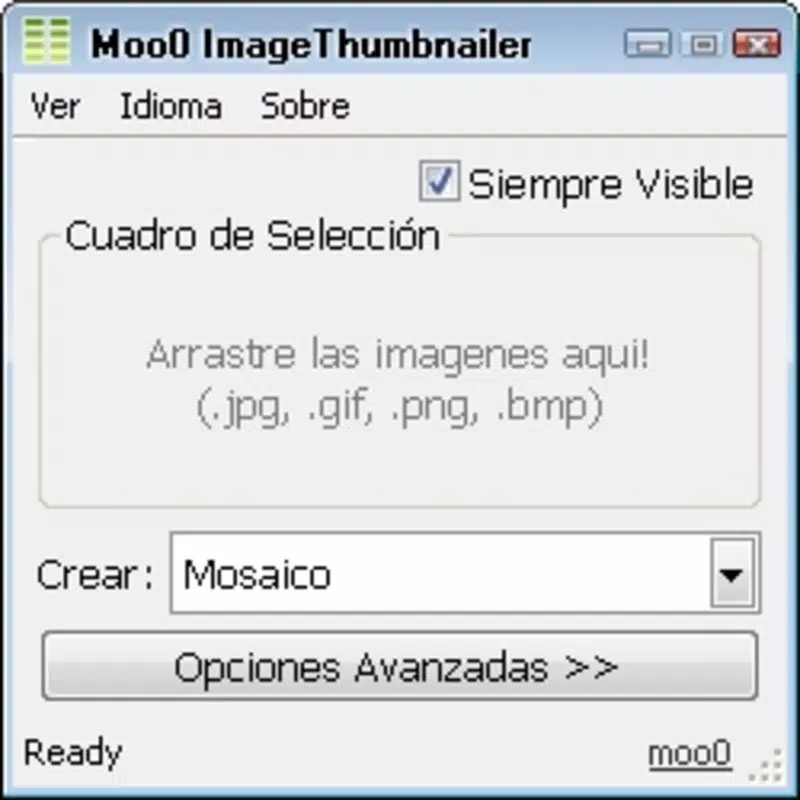
- User-Friendly Interface: The clean, uncluttered layout prioritizes functionality over visual complexity. The interface requires no setup or configuration, allowing users to begin resizing images immediately after launching the application.
- Lightweight and Efficient: At just 1.4 MB, the app consumes minimal system resources, ensuring smooth operation on older or low-spec machines. This efficiency makes it suitable for use on a wide range of Windows systems without performance degradation.
For example, a blogger preparing content for a website can drag a folder of high-resolution photos into the app, select a standard thumbnail size, and generate optimized images in seconds. Similarly, a student compiling a digital portfolio can quickly resize images to meet submission guidelines without using complex software.
Interface, UX & Performance
The user interface of Moo0 ImageThumbnailer is minimalistic and functional, emphasizing ease of use over visual flair. The main window features a central drop zone, clearly labeled to guide users through the drag-and-drop process. Navigation is intuitive—there are no menus, settings panels, or hidden options, which reduces cognitive load and prevents user confusion.
Interaction is direct: users place images into the window, choose a size, and the app generates the thumbnail. This streamlined flow supports rapid task completion and enhances productivity. Although the developer did not list formal performance metrics, the app’s lightweight nature suggests consistent responsiveness across different device categories, including older Windows systems.
Stability appears to be a strength, as the application operates without crashes or freezes during standard use. The lack of background processes or resource-heavy operations contributes to its reliable performance. However, specific compatibility details were not disclosed, and the app’s age raises questions about long-term support on newer Windows versions.
Platform Compatibility & Technical Requirements
Moo0 ImageThumbnailer is designed for the Windows operating system. The app is available in version 1.18.0 and has a file size of 1.4 MB. It is distributed as a free tool, requiring no installation or registration to use.
The developer did not specify minimum OS requirements or compatibility with specific Windows versions beyond the platform. As such, users should verify functionality on their system before use. Given the app’s release date in 2010, it may not support the latest Windows features or security protocols. Compatibility with modern systems remains unconfirmed.
Pros and Cons
Pros
- Lightweight and fast, ideal for older or low-resource systems.
- Simple drag-and-drop interface requires no technical expertise.
- Automatic saving to the original file location improves workflow efficiency.
- Supports multiple thumbnail sizes for flexible output.
- Free to download and use with no hidden costs.
Cons
- Platform limited to Windows; no support for Android or iOS.
- Age of the app raises concerns about compatibility with newer operating systems.
- No visible update history or official support channel.
- Limited customization options beyond size selection.
- Does not support batch processing with advanced filtering or naming rules.
FAQ
Is Moo0 ImageThumbnailer safe to download?
Yes, the app is distributed as a free, standalone executable. It does not require installation and does not contain known malware. However, users should always scan downloaded files with up-to-date antivirus software.
Can I use this app on Windows 11 or Windows 10?
The app was released in 2010, and the developer did not provide official compatibility details. While it may run on newer Windows versions, performance and stability are not guaranteed.
Does Moo0 ImageThumbnailer support batch processing?
Yes, users can drag multiple images into the app window at once. The tool processes each file individually and generates thumbnails in sequence.
Is there a mobile version of this app?
No. Moo0 ImageThumbnailer is a desktop application designed exclusively for Windows. There is no Android or iOS version available.
How do I update the app?
As of now, there is no official update mechanism. The current version is 1.18.0, and no newer releases have been announced by the developer.
Final Thoughts
Moo0 ImageThumbnailer remains a dependable tool for users who need fast, no-frills image resizing on Windows. Its lightweight design, intuitive interface, and automatic saving functionality make it a practical choice for individuals managing digital images without the need for complex software. While its age and lack of updates may pose compatibility concerns, its core functionality continues to serve its intended purpose effectively.
Those who value speed, simplicity, and resource efficiency will find the most value in this app. It’s particularly useful for bloggers, students, and small-scale content creators who require quick thumbnail generation without overhead.
Despite its limitations, Moo0 ImageThumbnailer delivers on its promise: fast, reliable image resizing with minimal effort. For users on Windows seeking a secure, free, and efficient solution, it remains a viable option.
Download Moo0 ImageThumbnailer now


